
SHOPIFY SETUP

How
to Add Multi-Currency Support to Your Shopify Store
E-commerce has become a global
marketplace. Today’s Shopify store owners aren’t limited to selling in just one
region customers from across the world are browsing, comparing, and making
purchases online. But here’s the catch: if shoppers can’t view prices in their
local currency, they’re far less likely to buy.
That’s where Shopify’s multi-currency setup comes in. Enabling multiple currencies in your store not only makes the buying process easier for international customers but also builds trust, reduces friction at checkout, and ultimately drives higher conversions.

In
fact, studies show that over
90% of shoppers prefer to shop in their own currency, and
nearly half abandon carts when forced to pay in a foreign one. This highlights
just how important currency localization has become in building trust, reducing
friction, and increasing conversions.
 |
Watch How to add multiple currency in shopify via YouTube
This
guide will walk you through the exact steps to
set up multi-currency support on your Shopify store and share best practices to
ensure your store is optimized for international buyers. By the end, you’ll be
equipped to take your brand global and serve customers in a way that feels
native to them no matter where they are in the world.
In this guide, we’ll walk through exactly how to set up multi-currency support in Shopify from enabling it in Shopify Payments to customizing rounding rules and offering currency selectors. By the end, you’ll have a store ready to serve customers around the globe seamlessly.
Why Multi-Currency
Support Matters

Before diving into the setup, let’s
quickly explore why this feature is so important:
- Global
reach:
Break down barriers and appeal to customers worldwide.
- Reduced
cart abandonment: Customers see prices in their familiar currency,
leading to fewer surprises at checkout.
- Boosted
conversions:
Transparency in pricing builds trust and confidence.
- Professional
branding:
Showing localized prices positions your brand as global-ready.
Step-by-Step: How to
Add Multi-Currency to Your Shopify Store

1. Confirm You’re
Using Shopify Payments
Multi-currency is only available
through Shopify Payments.
- Go
to Settings > Payments in your Shopify admin.
- If
Shopify Payments isn’t enabled, set it up first. (Note: availability
depends on your country).
2. Enable Currencies
in Shopify Payments
Once Shopify Payments is active:
- Navigate
to Settings > Payments > Shopify Payments > Manage.
- Scroll
to the Currencies section.
- Select
the additional currencies you want to support (USD, GBP, EUR, AUD, etc.).
- Save
changes.
3. Customize Rounding
Rules
Shopify allows you to round prices
for foreign currencies, keeping them clean and professional. For example:
- Instead
of showing $19.47, you can round it to $19.99.
- Access
this option in Payments > Manage > Rounding Rules.
This prevents awkward pricing that may
discourage buyers.
4. Add a Currency
Selector to Your Store
Your customers need a way to switch
between currencies. Options include:
- Theme
Settings:
Many Shopify themes come with a built-in currency selector in the header
or footer.
- Geolocation
App (by Shopify): Automatically detects a customer’s location and
suggests the correct currency.
- Manual
Customization:
Developers can code a dropdown menu for custom themes.
5. Test the Setup
Before going live:
- Use
Shopify’s Preview Store feature to check the currency switcher.
- Test
purchases in different currencies (if possible).
- Confirm
checkout and order details are working correctly.
6. Consider
Limitations
- Checkout
Currency:
Even if prices are displayed in multiple currencies, the actual checkout
currency is usually the store’s base currency (unless you enable Shopify
Markets).
- Refunds: Refunds will be
issued in the customer’s payment currency.
- Third-Party Gateways: If you’re not using Shopify Payments, multi-currency may not work.
- Display currency switchers prominently (header or sticky bar).
- Use Shopify’s Geolocation App for automatic detection.
- Regularly review exchange rates and rounding rules.
- Offer localized support and shipping rates for a full international experience.
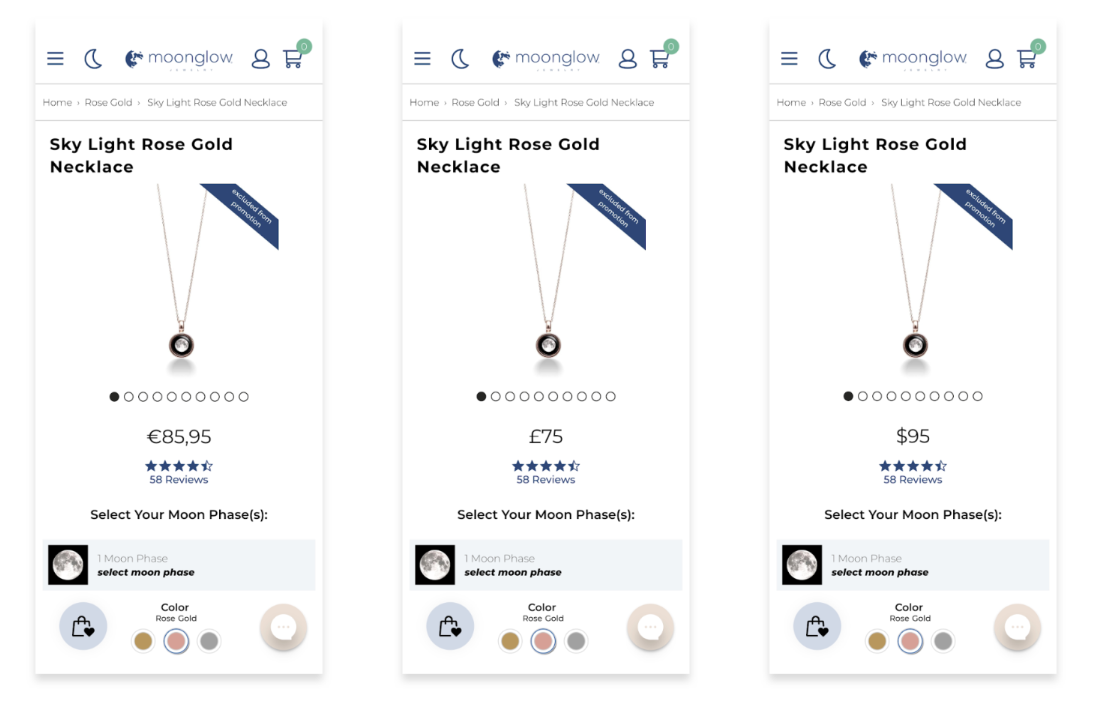
Final thought

Think of it this way: when a customer in
London sees prices in British Pounds, or a customer in Sydney sees Australian
Dollars, they instantly feel like your store was built with them in mind. That
personalization fosters confidence, removes hesitation, and can significantly
boost your revenue.

The global e-commerce market is
projected to exceed $8 trillion by 2027. The sooner you prepare your
Shopify store with multi-currency support, the sooner you can tap into that
massive opportunity. Don’t wait until competitors get there first start today,
and position your store as a truly global brand.
Adding multi-currency support to your Shopify store isn’t just a technical upgrade it’s a strategic growth move. Customers today expect a shopping experience that feels tailored to them, and showing prices in their own currency is one of the simplest yet most powerful ways to meet that expectation.

When you make this adjustment, you’re not just reducing cart abandonment you’re signaling to the world that your brand is serious about serving international customers. From Europe to Asia, Australia to North America, buyers will feel more comfortable, more confident, and more connected to your store.
The
best part? Setting it up on Shopify is straightforward and doesn’t require
heavy coding or complex integrations.
As
global eCommerce continues to boom projected to surpass $8 trillion by 2027 merchants
who adopt localization strategies early will be the ones who stay ahead.
Multi-currency is the foundation of international selling, and once you
implement it, you open the door to more advanced strategies like local payment
methods, region-specific offers, and even multilingual support.
In short, adding multi-currency support is about more than just displaying different symbols on your product pages. It’s about building trust, boosting sales, and positioning your Shopify store as a truly global brand. If your goal is to scale beyond borders, then enabling multiple currencies isn’t optional it’s essential.
Are you now ready to level up your Shopify store? bookmark this tab and apply what you've learnt. Check back for more real and working tips for your Shopify store, Comment and follow us by submitting your email for any new articles that will help your ecommerce business grow. Thank you.






0 Comments
We are happy to see your feedback